
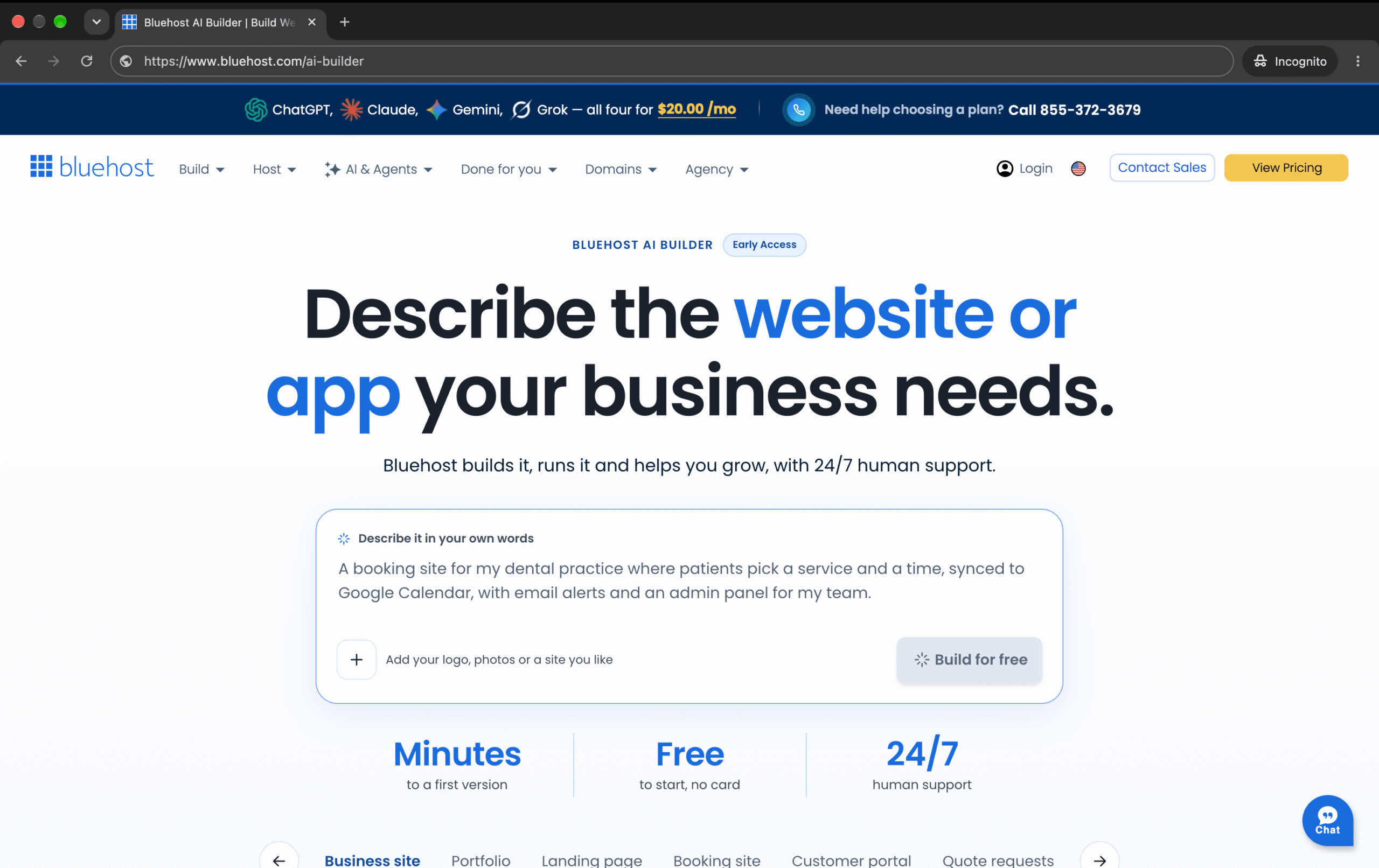
Learn how to turn a simple website idea into a published website without coding, using Bluehost’s AI-powered website creation platform.
Sponsored Content: This article is part of a paid collaboration with Bluehost and contains affiliate links. I may receive a commission when you sign up or make a purchase through these links, at no additional cost to you.
Most people starting a business already have a fairly good idea of what they want their website to look like. They know which services they want to promote, what information customers need and how they would like their brand to appear online.
The difficult part is turning those ideas into an actual website.
Hiring a developer isn’t always practical, particularly when you’re just getting started. Building everything yourself can also become time-consuming when you’re unfamiliar with web design, hosting and technical setup.
Fortunately, you no longer need to understand programming to create a functional website.
AI-powered website builders have made the process considerably simpler. Instead of arranging every design element manually, you can explain your requirements and have artificial intelligence create the initial website for you.
One option is Bluehost AI Builder, a website creation tool that allows users to build, customize and publish websites through written instructions.
You can even start with a free account and publish a working website without providing credit card details.
But getting a good result still requires some planning. Knowing what to ask for, what to check and which features matter can make a difference.
Let’s explore how the platform works and how you can use it to create a website that serves a real purpose.
Why Your Website Still Matters
Social media profiles are useful, but they don’t always provide everything a business needs.
A potential customer might discover your company through Instagram, for example, but still want to visit a website before making an inquiry.
They may be looking for a complete service list, opening hours, examples of previous work or a professional email address.
A website gives you a central place to present that information.
It also allows you to organize your content around the questions customers are likely to ask.
A freelance designer might need a portfolio and inquiry form. A home repair business may want separate pages describing its services. A consultant could benefit from a website explaining their experience and how clients can arrange a consultation.
These websites don’t necessarily need advanced development.
What they need is a clear structure, useful information and a design that works properly across different devices.
That’s where an AI website builder can help.
Introducing Bluehost AI Builder
Bluehost AI Builder is a tool developed to create websites and browser-based web applications using natural language.
Natural language simply means the kind of instructions you’d normally give another person.
You don’t have to write code or understand complicated technical commands.
You could ask the platform to create a website for a personal training business, including a homepage, trainer profiles, a schedule and a way for visitors to make inquiries.
The AI interprets your description and begins assembling the website.
It can also ask questions when additional information is needed.
Once the first version is ready, you can review it and request further adjustments through the same conversation.
Bluehost AI Builder also takes care of hosting, so you don’t have to arrange a separate hosting package to make the finished website available online.
Plan Your Website Before You Start
One common mistake beginners make is opening a website builder without deciding what the website should accomplish.
That often leads to unnecessary changes later.
Before creating your first website, spend a few minutes answering three questions.
What Is the Website For?
Think about the main reason someone would visit.
Are you trying to attract new customers, collect inquiries, display your work or share information?
A website that encourages visitors to request a quote will need a different layout from one designed to showcase photography.
Who Will Visit It?
Consider your intended audience.
For example, a website for a local gardening service should probably focus on service areas, pricing information, examples of completed work and easy contact options.
A website for a financial consultant would usually benefit from a more formal design and detailed explanations of the services offered.
Understanding your audience makes it easier to choose suitable content and design elements.
What Pages Do You Need?
For many smaller websites, a few well-written pages are enough.
A practical starting structure might include a homepage, About page, Services page, Frequently Asked Questions page and Contact page.
You can expand the website later when necessary.
The important thing is to begin with a clear purpose rather than adding pages simply to make the website look larger.
Creating a Website with Bluehost AI Builder
Let’s use a hypothetical example to understand the process.
Imagine you’re starting a residential landscaping business called Greenfield Lawn Care.
You want potential customers to understand your services, see examples of your work and contact you for estimates.
Here’s how you could approach building the website.
1. Start with a Detailed Description
Visit Bluehost AI Builder and describe the website you want to create.
Rather than entering something vague like “Make a landscaping website,” provide useful details.
For example:
“Create a professional website for Greenfield Lawn Care, a residential landscaping business. We offer lawn maintenance, garden design, seasonal cleanup and hedge trimming. Use a fresh, welcoming design with natural green and neutral colors. Include a homepage, individual service sections, an About page, a photo gallery and a contact form for estimate requests.”
This description tells the AI what the business does, which pages are needed and what visual style to follow.
You can make the prompt more specific by mentioning your preferred tone, target customers and location.
2. Provide Your Branding Materials
If you already have a logo or business photographs, use them.
Bluehost AI Builder supports common image formats such as JPG, PNG and WebP, with uploads up to 5 MB per image.
You can also provide a website address for design inspiration.
For a landscaping business, photographs of completed projects would usually be more meaningful than generic pictures.
Original images help visitors understand the actual work you provide.
You don’t need to have every image ready before getting started, though. The builder can create visual content that you can personalize later.
3. Review the Initial Design
After processing your requirements, the platform creates an initial version of the website.
This is the stage where you should look beyond the overall appearance.
Check whether the homepage explains your business clearly.
Look at how the services are arranged and whether visitors can easily find the contact information.
Also consider the order of the content.
If requesting an estimate is the main goal, that option should be visible without making visitors search for it.
Bluehost AI Builder provides a live preview, allowing you to see the website as it takes shape.
4. Refine the Website with Instructions
You don’t need to accept every design decision made by the AI.
Suppose the homepage contains too much text or the service descriptions are too general.
You could enter:
“Shorten the homepage introduction and make the Request an Estimate button more prominent. Add separate sections explaining lawn maintenance, garden design and seasonal cleanup.”
The AI can then update the relevant sections.
You can request changes to layouts, images, text and other elements.
This makes the editing process easier for beginners who might otherwise struggle with traditional design interfaces.
5. Check the Mobile Version
Before publishing, review how the website appears on a phone.
A layout that looks attractive on a large computer screen may feel cluttered on a smaller display.
Bluehost AI Builder creates mobile-responsive websites and provides previews for different screen sizes.
Pay particular attention to navigation menus, buttons, images and contact forms.
If something doesn’t look right, describe the problem and ask the AI to correct it.
6. Publish and Share Your Website
When the content and design are ready, you can publish the website.
With the free plan, Bluehost provides an automatically generated address ending in .app.bluehost.ai.
You can share that link with others and use it to review the published website.
If you’re establishing a permanent business presence, you may prefer a custom domain.
Connecting your own domain requires a paid plan.
What Can Bluehost AI Builder Handle for You?
The platform covers several tasks that would otherwise require separate tools or manual setup.
Website layouts: It can organize pages and sections around your business requirements.
Written content: It generates headlines, descriptions and other website text that you can edit to match your brand.
Images and visual elements: You can use generated imagery or replace it with your own materials.
Responsive design: Websites are designed to adjust to desktop, tablet and mobile screens.
Basic search optimization: Page titles, descriptions, headings and image alt text can be generated automatically.
Website hosting: Hosting is included across all plans, even the free option.
Ongoing changes: After launch, you can continue editing the website through conversation.
The builder can also create browser-based web apps for functions such as booking requests, forms and customer-facing tools.
These capabilities are useful, but you should still check that anything the AI creates matches your actual requirements.
Making Your Website More Useful to Visitors
A visually attractive website isn’t necessarily an effective one.
Imagine visiting a local business website that looks polished but doesn’t explain what the company does or how to contact anyone.
The design might be impressive, but the website hasn’t done its job.
When reviewing an AI-generated website, focus on the information visitors need.
Your homepage should quickly explain the business and its main offering.
Service pages should describe what’s included without relying on complicated language.
Contact details should be easy to find.
If you use testimonials, make sure they come from genuine customers. Don’t publish invented reviews or AI-generated claims as real experiences.
The same principle applies to business achievements, certifications and pricing information.
Use AI to help present accurate information, not manufacture it.
Can an AI-Built Website Appear in Google Search?
Yes, websites created with AI can appear in search results, provided they are accessible to search engines and meet the usual indexing requirements.
Bluehost AI Builder helps with several technical SEO basics.
It generates page titles, meta descriptions, headings and alternative text for images.
However, these elements are only the starting point.
You still need relevant content that answers your audience’s questions.
For example, a landscaping business serving a particular city should clearly mention its location, service areas and the work it performs.
There is also an important distinction between Bluehost’s free and paid publishing options.
Websites published on the free .app.bluehost.ai address aren’t indexed by search engines. To make your website eligible for normal search discovery, you’ll need to connect a custom domain through a paid plan.
Even then, appearing at the top of Google isn’t guaranteed.
Search performance depends on content quality, competition, relevance and other factors.
How Much Does Bluehost AI Builder Cost?
Bluehost offers a free plan alongside three paid options.
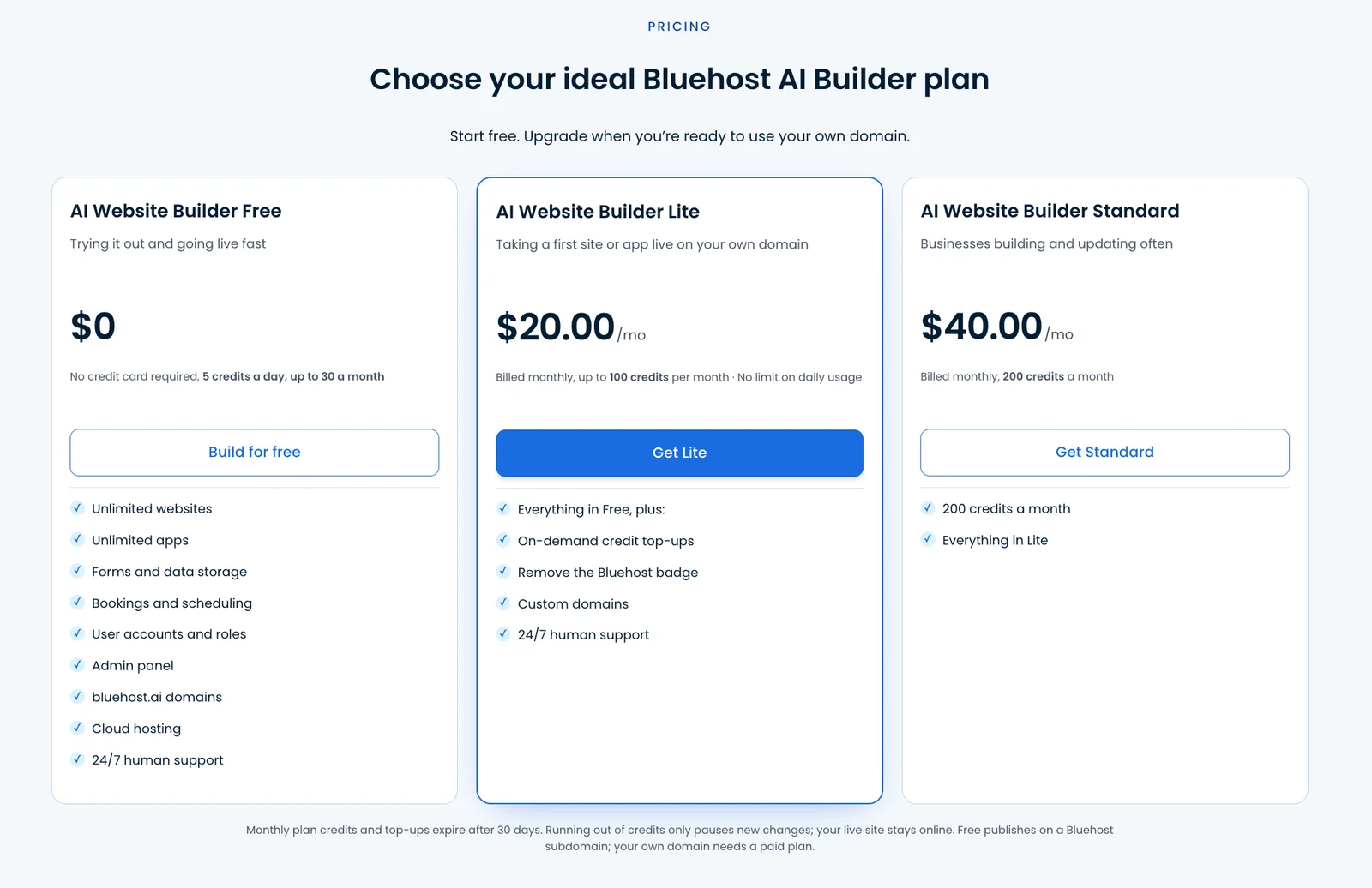
Here is the pricing structure listed for November 2026.
| Plan | Monthly Price | Included AI Credits |
|---|---|---|
| AI Builder Free | $0 | 5 per day, maximum 30 per 30 days |
| AI Builder Lite | $20 | 100 per month |
| AI Builder Standard | $40 | 200 per month |
| AI Builder Pro | $80 | 400 per month |
Prices are in USD. These are monthly billing prices, and alternative billing terms may be available. Always check the current price before purchasing.
All four plans include hosting.
The Free plan lets you build and publish using a Bluehost subdomain, while paid subscriptions allow you to connect a domain you own.
The main difference between paid plans is the number of AI credits available for building and editing.
For a basic website that doesn’t require frequent changes, the Lite plan may provide enough credits.
If you regularly create new pages or maintain several projects, a higher allowance could be useful.
What Are AI Credits, and Why Do They Matter?
Bluehost AI Builder uses credits to measure the work you request from its AI.
A message that asks the builder to create or change something generally consumes one credit.
This applies whether you’re requesting a substantial feature or a small adjustment.
For example, changing a headline uses one credit. Asking the builder to add an entire new section also uses one credit.
Questions from the AI that help clarify your requirements don’t consume credits.
The same applies to hosting your published website.
This makes planning your requests worthwhile.
Instead of sending several separate messages to change a heading, adjust its color and update a button, you can include those related instructions in one carefully written request.
If you use all your available credits, your website remains published. You simply need to wait for your allowance to refresh or purchase additional credits before making more changes.
Paid users can purchase credit top-ups, starting at $15.
Monthly credits and top-ups expire after 30 days.
When Is Bluehost AI Builder a Good Choice?
The platform is most appealing when you need a website but don’t want to manage its technical development yourself.
A freelancer could create a professional portfolio and inquiry page.
A small consultancy might build a website explaining its services and experience.
A community organization could publish information about activities and upcoming events.
Someone exploring a new business idea could create a simple website before investing in a more elaborate setup.
It can also be useful for building browser-based tools such as request forms, appointment-related features or small internal applications.
The Free plan offers a way to explore these possibilities without an immediate financial commitment.
Where Might You Need a Different Solution?
Bluehost AI Builder isn’t designed for every website project.
Most importantly, it currently doesn’t support ecommerce transactions.
If you need a shopping cart, product checkout and online payment processing, Bluehost offers a separate product called Bluehost AI Store.
The builder also creates web applications that run in browsers, not native apps distributed through the Apple App Store or Google Play.
Another consideration is development control. Bluehost AI Builder doesn’t currently provide direct source code export, so it may not suit developers who require full access to website files or want to move their code to another platform.
For complex projects with highly specialized requirements, a traditional development approach may be more appropriate.
A Few Things to Check Before Launching
Once your AI-generated website looks ready, take some time to test it.
Open every page and make sure the navigation works.
Read the content carefully, particularly business descriptions and contact information.
Check buttons and submit a test inquiry through any forms you’ve added.
Review the site on both a computer and a mobile phone.
Make sure you have the appropriate rights to use any photographs, logos or other materials included on the site.
Finally, ask someone unfamiliar with your business to look at the website.
If they can quickly understand what you offer and how to contact you, you’re heading in the right direction.
Frequently Asked Questions
Do I need to install WordPress?
No. Bluehost AI Builder works as its own website creation platform, so WordPress isn’t required.
Is there a time limit on the free plan?
Bluehost states that its AI Builder Free plan has no fixed end date. You can continue using it subject to the applicable usage and inactivity terms.
Can I add my existing logo and photographs?
Yes. You can upload branding assets and photos to help shape the website’s appearance.
Does Bluehost provide support if something goes wrong?
Bluehost offers 24/7 human support for AI Builder users, including those on the free plan. Support can assist with the platform, domains, hosting and related issues.
Can I manage multiple websites?
Yes. Bluehost AI Builder supports multiple website and web app projects, although your available AI credits and usage limits still apply.
Will my website disappear if I have no credits left?
No. Running out of credits pauses additional AI changes. It doesn’t automatically take your published website offline.
Final Thoughts
Creating a website doesn’t have to begin with learning programming or hiring someone to manage every technical detail.
For people who already know what they want their website to accomplish, Bluehost AI Builder provides a practical way to turn those ideas into something visitors can actually use.
It helps with the first design, content creation, layout adjustments and publishing. You remain responsible for providing accurate information and making sure the finished website meets your needs.
The free publishing option is especially helpful for experimenting before paying for a subscription.
If you’re planning a portfolio, business website or personal project, you can start with a description and see how far the builder gets you.
No credit card is required to begin, and you can decide whether a paid plan makes sense once you understand what your website needs.